 Biscuit Wallet
Guide · · 7 min read
How to swap crypto over Tor, without KYC
What an exchange sees, what Tor hides, and how to keep a swap inside Tor
Short answer: a no-KYC exchange doesn’t ask who you are, but unless you hide it, it still sees your IP address, which points to your internet provider and, through it, to you. To swap over Tor, you need an exchange that accepts Tor connections and a way to reach it through Tor from start to finish. In Biscuit, turn on Tor mode and swap as usual: the offers then come only from exchanges that never ask for ID, reached through Biscuit’s onion address, so the swap never leaves Tor.
Tor hides where you connect from. It doesn’t hide what you swap: the coins, the amounts and the addresses are still seen by the exchange, and on a public blockchain by everyone. This guide explains both halves, so you know what you are protecting and what you aren’t.
What does an exchange see when you swap?
When you create a swap, the exchange learns:
- which coins you swap, and how much;
- the address you receive at, and your refund address if you give one;
- the deposit you send, and from there, on a public blockchain, the address it came from;
- the time of each step;
- your IP address, and on a website, details of your browser.
“No KYC” removes your name and your passport from that list. It doesn’t remove the IP address. Your internet provider knows which subscriber had that address at that time, so an IP address in an exchange’s logs is a name one step away: for whoever can ask the provider, or whoever gets hold of the logs. Exchange data does leak. In May 2026, a researcher reported that one swap service’s partner API let anyone read full swap histories (see Exchange ratings).
Tor removes the last line of the list. The rest stays, which is why the address you receive at matters as much as the connection: more on that below.
Why do so many swap services block Tor?
If you have tried to swap in Tor Browser, you have probably met endless “are you human” checks, or a page that never loads. There are three usual reasons:
- Bot protection. Many sites sit behind services that score visitors by their IP address. Tor exit addresses are shared by thousands of people, so they score badly and get challenged or blocked.
- Fraud rules. Some exchanges simply refuse connections they can’t place on a map.
- Partners’ rules. Aggregators, which gather offers from many exchanges, set rules for the apps that use them. Trocador, the aggregator Biscuit uses outside Tor mode, requires us to record the IP address each swap is created from. Over Tor, that address is hidden, so rather than record anything, Biscuit turns Trocador off in Tor mode.
A few exchanges go the other way: they accept Tor, some run their own onion sites, and their terms say they will never ask for identity. Those are the ones Biscuit uses in Tor mode.
How does Biscuit swap over Tor?
Biscuit includes Tor: there is nothing else to install. In Tor mode, the swap request leaves your computer through Tor and arrives at Biscuit’s own onion address, without ever touching the open internet. Biscuit’s server then asks the exchanges for offers and creates the swap with the one you choose.
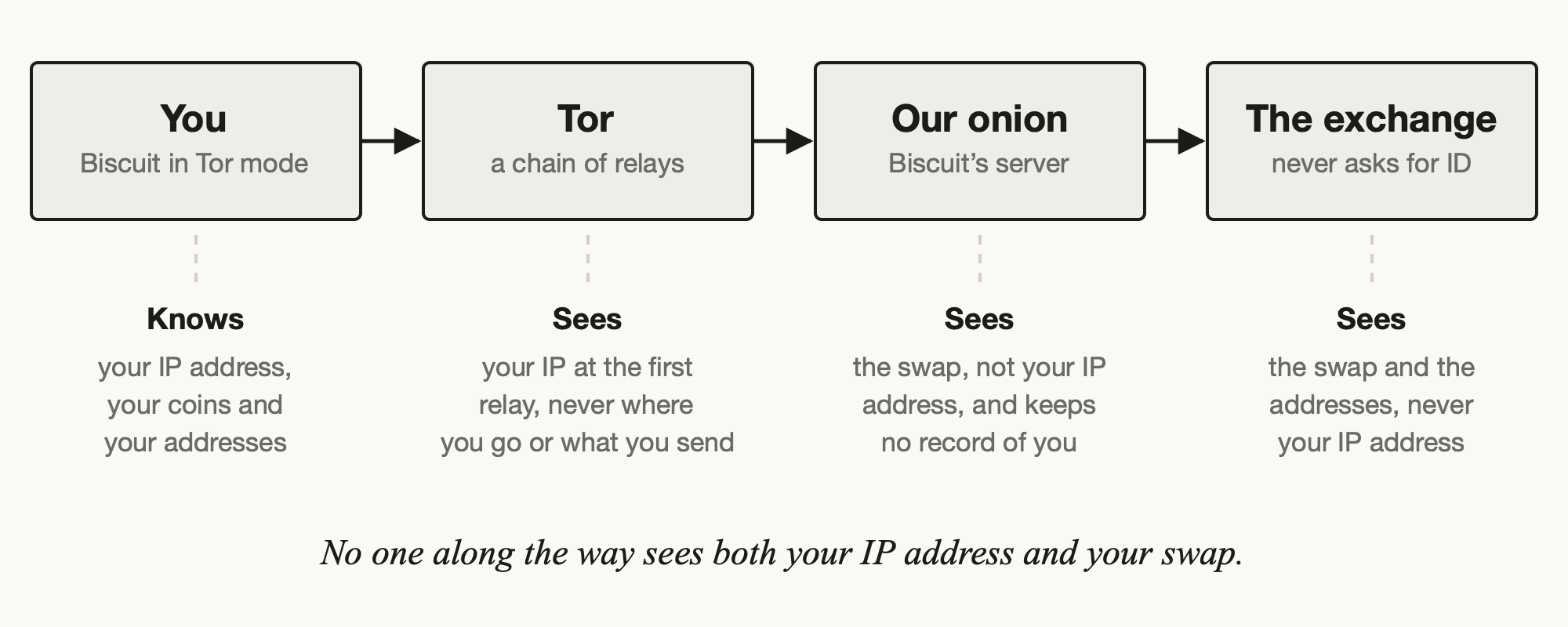
The exchange sees a request from our server, not from you. Our server sees the swap, but it arrives through Tor, so it doesn’t know where from, and for these swaps it keeps no record of you. With the default settings, the deposit you send for the swap goes through Tor too: Biscuit reaches its Electrum servers and nodes through Tor, and Monero nodes over .onion addresses.
How to swap over Tor in Biscuit, step by step
- Turn on Tor mode: at first launch, or later in Settings › Network › Proxy, or by clicking the onion at the bottom right of the window. It turns purple when Tor mode is on.
- On Swap, choose what you send, what you get, and the amount. Any two coins of your wallet work.
- Choose Fixed or Floating. A fixed rate gives you exactly the amount shown; with a floating rate, what you get follows the market a little.
- Receive at: keep the new address Biscuit proposes in your own wallet. Refund to: where the coins go back if the swap fails.
- Get offers. In Tor mode they come only from exchanges that never ask for ID, ranked by what you receive. Each shows its minimum and maximum.
- Pick one, Create swap, then Send from this wallet… to pay the deposit after you confirm.
- Follow it under History. If you close Biscuit, it picks the swap up again next time.
Getting offers takes a few seconds longer than without Tor. The swap itself waits on the blockchains, as always: minutes for most coins, longer for Bitcoin, about 20 minutes for Monero.
Which exchanges work over Tor in Biscuit?
In Tor mode, Biscuit offers three exchanges that it calls itself: PegasusSwap, ETZ-Swap and Stereoswap. All three are listed at level 0 by kycnot.me, an independent directory that reads exchanges’ terms: their terms say identity checks will never be requested.
Level 0 is a promise in writing, not a guarantee of a smooth swap. Every exchange holds your coins for the time of the swap, and each of these three has a history worth knowing: user reports of held swaps at PegasusSwap in September and October 2026, a short warning about ETZ-Swap in October, and very little track record yet for Stereoswap, which started in 2026. Our Exchange ratings page sets out what each one’s terms allow, what users have reported, and the open incidents, with sources. We check it again before every release.
Outside Tor mode, the same three are ranked alongside Trocador’s offers, always by what you receive. Biscuit never adds a fee to any of them.
What doesn’t Tor hide in a swap?
Tor protects the connection. The coins tell their own story:
- Public blockchains. On every chain except Monero’s, the deposit and the payout are visible to anyone. If your deposit comes from an address linked to your name, for example a withdrawal from an exchange that checked your ID, the swap is linked to it too, Tor or not.
- Address reuse. Receiving the swap at an address you have used before ties it to everything else on that address. Biscuit proposes a new one each time: keep it.
- Monero is different. Once the coins are Monero in your own wallet, the amounts and addresses are hidden on the blockchain. Swapping into Monero over Tor hides both the connection and where the coins go next.
- What you send stays visible to the exchange. Tor doesn’t change the exchange’s rules. Some check deposits for risk and send flagged ones back to the refund address: always give one.
Can I swap over Tor without Biscuit?
Yes, in Tor Browser, if the exchange lets you in. Some no-KYC exchanges publish an onion address: take it from the exchange’s own site or from kycnot.me, never from a search result or a forum post, because fake onion sites copy real ones to steal deposits. Expect most swap sites to need JavaScript, which Tor Browser’s Safest level turns off.
If you hold Bitcoin and want Monero, there is also a way with no exchange at all: an atomic swap. In Biscuit it works in Tor mode too.
Quick answers
Do I need to install Tor or Tor Browser?
No. Biscuit includes Tor and starts it for you. If Tor already runs on your computer, Biscuit offers to use it. On Tails and Whonix, Biscuit uses the system’s Tor and Tor mode is always on.
Why don’t I see Trocador offers in Tor mode?
Trocador requires us to record the IP address each swap comes from, which Tor hides. Rather than weaken that, Biscuit only shows exchanges it can reach without recording anything. Trocador swaps already running can be followed again once Tor mode is off.
Is a swap over Tor anonymous?
Nobody along the way knows both who you are and what you swap. But the coins themselves can point to you on a public blockchain, as explained above. Swapping into Monero, at a new address in your own wallet, is the most private way to end a swap.
Can the exchange still freeze my swap?
Tor hides your connection, not your deposit, so each exchange’s own rules still apply. The three used in Tor mode say they never ask for ID; some send a deposit they reject back to your refund address. Start with a small swap with an exchange you haven’t used.
Does it cost more over Tor?
No. The offers are the exchanges’ own rates, and Biscuit adds no fee, in Tor mode or not.
Learn more
- Exchange swaps: the full reference
- Exchange ratings: who the exchanges are
- Tor mode: what goes through Tor in Biscuit
- Our onion service
- How to get Monero without KYC
- How to swap Bitcoin for Monero without an exchange
Questions? Write to us through the contact page.