 Biscuit Wallet
Guide · · 5 min read
How to swap Bitcoin for Monero without an exchange
Atomic swaps, explained step by step
You can trade Bitcoin for Monero directly with a market maker through an atomic swap. No one holds your coins in between: either the swap completes and the Monero lands in your wallet, or your Bitcoin comes back to you. In Biscuit, a free, open-source desktop wallet, an atomic swap takes about an hour and needs no account.

This guide explains how it works, what can go wrong, how it compares to an exchange swap, and how to do it yourself. Atomic swaps in Biscuit are in beta.
What is an atomic swap?
An atomic swap is a trade between two people across two different blockchains, built so that it can’t stop halfway with one side paid and the other not. Either both sides receive what they agreed to, or the swap is cancelled and your Bitcoin is refunded.
The other side of the trade is a market maker: someone who offers to sell Monero for Bitcoin, at a price and within limits they publish. You don’t open an account with them, and they never take custody of your coins.
The protocol Biscuit uses was created by the eigenwallet project. In Biscuit, swaps run in a separate program, biscuit-swapd, built from eigenwallet’s code and shipped with the wallet. It’s free software under the GPL-3.0, and its source is published with every release. Biscuit’s releases are signed and reproducible: anyone can rebuild them and get the same files.
How does it keep my Bitcoin safe?
Think of it as two locks, where opening one reveals the key to the other.
- Your Bitcoin is locked in a shared address that neither you nor the maker can spend alone.
- The maker locks the Monero in the same way.
- Biscuit gives the maker what they need to take the Bitcoin. The act of taking it reveals to Biscuit the key to the Monero, and Biscuit sweeps the Monero to your wallet.

The maker can’t collect the Bitcoin without handing you the key to the Monero: getting paid and paying are the same step. Your Bitcoin goes into the shared lock, never straight to the maker, and Biscuit releases nothing until the Monero is locked too.
Your keys never leave your computer, and Biscuit has no account, no analytics and no crash reports.
How long does it take?
About an hour, most of it spent waiting for Bitcoin confirmations. Keep Biscuit open until the swap is done. If Biscuit closes during a swap, the swap continues the next time you open the same wallet.
The Monero arrives on a new subaddress of your wallet.
What if the maker disappears?
If the maker never locks the Monero, the swap is cancelled after 24 Bitcoin blocks, about 4 hours, and your Bitcoin comes back to you automatically.
There is one condition: Biscuit must be running to claim the refund. After the cancel, you have about a day (144 blocks) to open it. After that, the maker may take the Bitcoin. So while a swap isn’t finished, open Biscuit at least once a day.

Do makers charge anything?
Each maker sets their own price. When you look for makers, Biscuit lists every offer with its price, its minimum and maximum, and how it compares to the market, so you can see the difference before you choose. The Bitcoin network fee is paid on top of the amount you swap.
Some makers also keep a small share of the Bitcoin if a swap is refunded. This discourages people from starting swaps they don’t finish. It shows in the Kept if refunded column; if you’d rather not take that risk, pick a maker that shows “none”.
What about my privacy?
To find makers, Biscuit asks public rendezvous servers. Without Tor, those servers and the makers you connect to can see your IP address. Tick Connect through Tor to hide it; finding makers then takes longer.

In Tor mode, and on Tails and Whonix, atomic swaps always use Tor. See Tor in Biscuit and Biscuit on Tails.
Atomic swap or exchange swap: which one should I use?
Biscuit offers two kinds of swaps, and each fits a different need.
Exchange swaps go through Trocador, which gathers offers from many exchanges at once. Biscuit ranks them by one thing, what you actually receive, and only shows exchanges rated A by Trocador: those that don’t ask for your identity. Biscuit adds no fee.
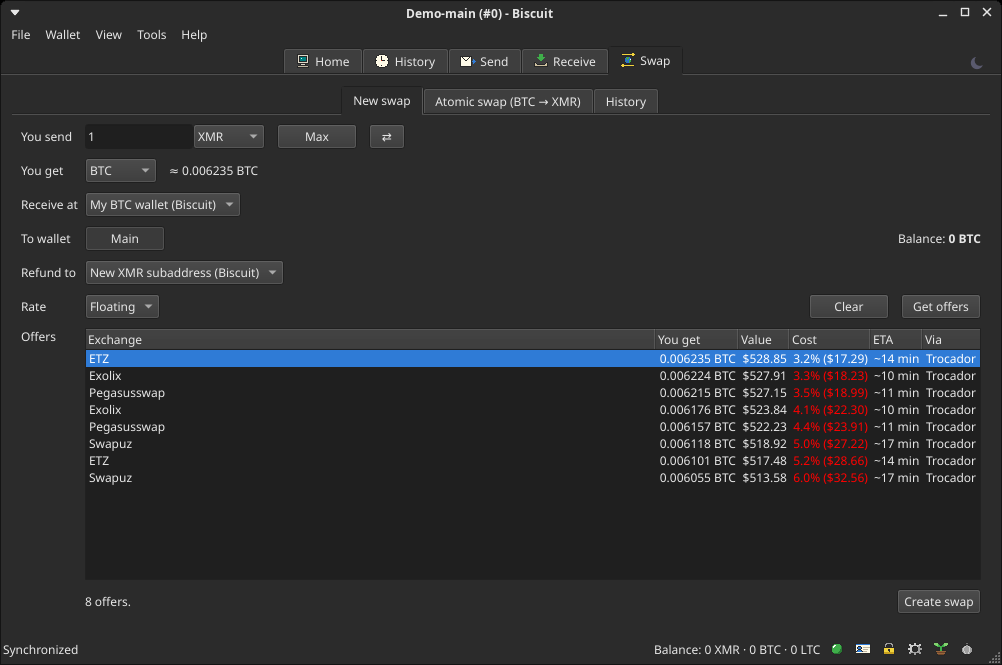
- They work between Monero, Bitcoin and Litecoin, in any direction, and are faster for some coins.
- The exchange holds your coins during the swap.
- Biscuit’s server, Trocador and the exchange see the swap and your IP address.
- They’re off in Tor mode, and on Tails and Whonix.
Atomic swaps work the other way around.
- No one sits in the middle, and no one holds your coins.
- They work over Tor.
- They only go from Bitcoin to Monero, take about an hour, and Biscuit must stay open.
If you’re sending Bitcoin, want Monero, and can leave Biscuit open for an hour, an atomic swap keeps your coins in your hands the whole time. If you need another direction or another pair of coins, use an exchange swap.
How to do it in Biscuit, step by step
- Make sure your Bitcoin wallet is set up and synchronized: the swap pays from it.
- Go to Swap and choose Atomic swap. Tick Connect through Tor if you want to hide your IP address.
- Click Find makers. Biscuit lists the offers it finds, with each maker’s price, minimum and maximum, how the price compares to the market, and what they keep if a swap is refunded.
- Pick an offer and enter how much Bitcoin to swap. Biscuit shows about how much Monero you’ll get. The Bitcoin network fee is paid on top.
- Click Start swap, then keep Biscuit open until it’s done. The Monero arrives on a new subaddress of your wallet.
If you don’t have Biscuit yet, you can download it for Windows, macOS and Linux.
What are the limits?
- One direction only. Atomic swaps go from Bitcoin to Monero, not the other way.
- About an hour. Most of it is spent waiting for Bitcoin confirmations.
- Biscuit must stay open. If it closes, the swap continues the next time you open the wallet.
- One swap at a time.
- Refunds need you. After a cancel, open Biscuit within about a day to get your Bitcoin back.
- Beta. Atomic swaps in Biscuit are still in beta.
Learn more
- Atomic swaps: the full reference
- Exchange swaps: swapping through Trocador
- Tor in Biscuit
- Biscuit on Tails
- Reproducible builds: how anyone can rebuild Biscuit and get the same files
Questions about atomic swaps? Write to us through the contact page.